Wi-Fi and Wired Logins Failing After the October 2026 Windows Update (802.1X Fix)
Windows · October 18, 2026
After the October 13, 2026 Patch Tuesday, some Windows 11 computers stopped connecting to company and school networks. The connection fails on Wi-Fi, or a wired port shows Connected, not authenticated. The cause is a security change in update KB5127648. This article explains what changed, who is affected, and what you can do about it.
Quick answer: if your network uses PEAP with MS-CHAPv2 and Windows signs you in automatically with your Windows account, the update can block that sign-in. Reconnecting and typing your username and password by hand works for many users. Administrators can temporarily set one registry value. The lasting fix is to move to certificate-based (EAP-TLS) authentication.
What "port authentication" means here
Many offices, schools and campuses use 802.1X, also called port-based network access control. The network will not give your device access until you prove who you are, whether you plug into a wall port or join a secure Wi-Fi network (WPA2/WPA3-Enterprise). A RADIUS server checks your credentials. Home networks with a normal Wi-Fi password do not use this.
Which update and which systems
- KB5127648 for Windows 11 24H2 (build 26100.9711), 25H2 (26200.9711) and 26H2 (26300.9711), released October 13, 2026.
- KB5126646 for Windows Server 2025 is named in some reports as carrying the same change.
- Most affected: domain-joined PCs using PEAP-MSCHAPv2 with the option Use my Windows user account (single sign-on), on Wi-Fi or wired 802.1X.
- Reported not affected: home Wi-Fi with a password (PSK), connections where you type the credentials manually, and EAP-TLS (certificate) setups.
Why it breaks
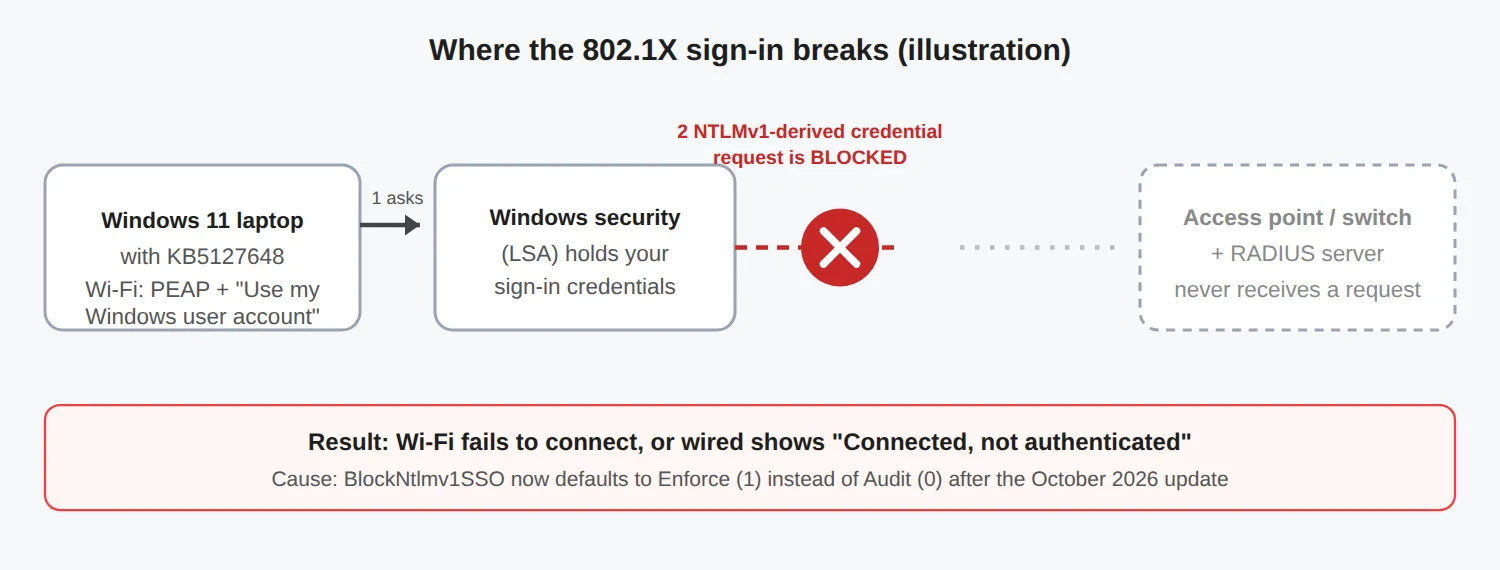
Reports say the update changes the default of a setting called BlockNtlmv1SSO from Audit (allow, but log a warning) to Enforce (block) on devices where Credential Guard is off. PEAP-MSCHAPv2 single sign-on relies on an old NTLMv1-derived credential that Windows hands to the network client. Enforce mode now refuses to hand it over, so the sign-in fails on the PC before anything reaches the network. That is also why your RADIUS or NPS logs can look empty.
A note on sources: reports differ on how officially this is documented. One outlet says Microsoft confirmed the issue, while another says the release notes do not mention NTLM or 802.1X. Check Microsoft's release health page for the current status before you rely on either claim.
How to confirm it is this problem
- Press
Win + R, typewinverand check for build 26100.9711, 26200.9711 or 26300.9711 or higher. You can also look for KB5127648 under Settings > Windows Update > Update history. - Open Event Viewer and look at the client logs. Reported signs are:
- WLAN-AutoConfig events 12011, 12014 and 12013 (error
0x80070285) for Wi-Fi. - Wired-AutoConfig events 15514 and 15506 for wired ports, with a 10-minute retry.
- Microsoft-Windows-NTLM/Operational event 4025, meaning an NTLMv1-derived sign-in was blocked by policy.
These event details come from a single vendor write-up, so treat them as a guide and not a guarantee.
Fix 1: for ordinary users (per device)
- Go to Settings > Network & internet > Wi-Fi > Manage known networks and choose Forget on the work or school network.
- Connect again and enter your username and password manually instead of choosing Use my Windows user account.
- If the profile was pushed by your IT team (Intune, for example), you may need to remove it first, then ask IT before reconnecting:
netsh wlan delete profile name="YOUR_WIFI_PROFILE_NAME"Fix 2: for administrators (temporary registry change)
Setting the value back to 0 restores Audit mode, which allows the old behaviour. Microsoft's guidance, as reported, is that this weakens security and should be temporary. Back up the registry first and restart afterwards.
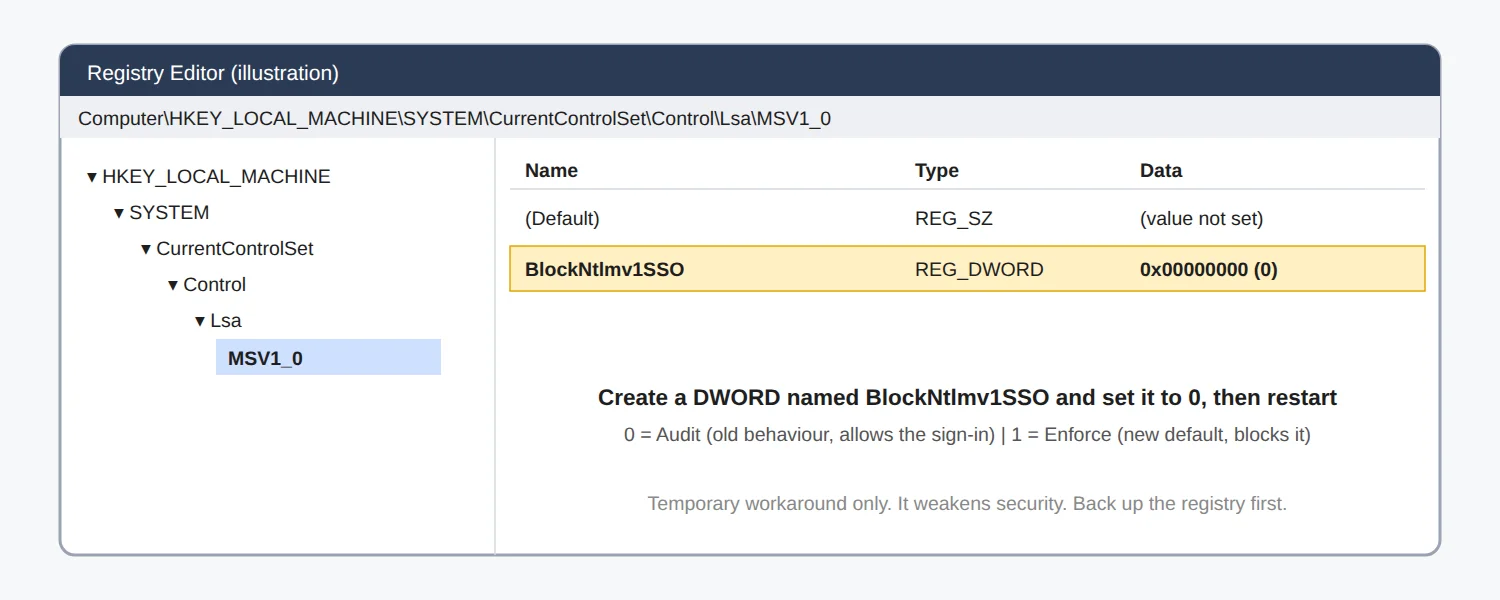
New-Item -Path "HKLM:\SYSTEM\CurrentControlSet\Control\Lsa\MSV1_0" -Force | Out-Null
New-ItemProperty -Path "HKLM:\SYSTEM\CurrentControlSet\Control\Lsa\MSV1_0" `
-Name "BlockNtlmv1SSO" -PropertyType DWord -Value 0 -Force- To deploy it at scale, use Group Policy Preferences (registry item) or an Intune remediation or script, since no ready-made policy setting is reported for it.
- It does not help devices that run Credential Guard, which already blocks this sign-in.
What not to do
- Do not uninstall KB5127648 just to get online. It removes the October security fixes, and it will reinstall unless updates are paused. Reports mention it also includes fixes for an actively exploited vulnerability.
- Do not leave the registry workaround in place forever.
The lasting fix
Move from PEAP-MSCHAPv2 (passwords) to EAP-TLS (certificates). You need a certificate authority that can issue device or user certificates through your device management, a RADIUS server set up for EAP-TLS, and a profile that deploys the certificates to your PCs. It takes planning, but it is more secure and avoids this whole class of problem.
Tip: if you only use home Wi-Fi with a password, this issue does not apply to you.
Sources
- Keytos: KB5127648 breaks PEAP RADIUS authentication
- Windows Report: October 2026 Patch Tuesday breaks Wi-Fi and VPN
- Microsoft: KB5127648 release notes
Details can change as Microsoft updates its guidance. Last checked October 18, 2026.
Comments